


(last updated: 2019-03-21 @ 15:00 EST / 2019-03-21 @ 19:00 UTC )
Intro
The other day, Steve Jones published a short post with a quick script to uppercase all string data in a database. I noticed that a few improvements could be made, so I thought I would give it a try.
While it’s rare to ever need to uppercase all string data in a database, I was curious if most, if not all, of this could be handled in a single query with multiple CTEs (Common Table Expressions). In the past I have used multiple CTEs, chained together, where some of the CTEs handled various stages of processing, and one (or more) of the CTEs merely provided simple calculations, either to reduce redundancy in the other CTEs, or to provide base data values in place of variables. This is not to say that there is anything wrong with using a cursor for tasks such as this. Cursors are actually well-suited for maintenance tasks and are more efficient than custom while loops over temporary tables or table variables (despite folks who scream about cursors being evil even though they haven’t done thorough testing, or any testing at all). Still, I think this can be done in a single SELECT statement.
I also wanted to address the complexities of working with:
- collations and Unicode data: not all versions of collations have uppercase and lowercase mappings, and using collations that don’t have all of the mappings can result in data-loss, or at least an incomplete operation, and neither situation will give any indication that anything went wrong. For complete details on the versions and missing mappings, please see: Differences Between the Various Binary Collations (Cultures, Versions, and BIN vs BIN2) (the “Different Versions” section). Things get even more interesting when you consider that the version 140 collations were not available prior to SQL Server 2017, and the version 100 collations were not available available prior to SQL Server 2008.
-
non-simplistic meta-data: T-SQL identifiers can contain any Unicode code point outside of U+0000 and U+FFFF. Not handling certain characters correctly can result in a broken script. Right square brackets (“
]“) need to be escaped when the identifier is delimited, and this is handled by theQUOTENAMEfunction. Single quotes (“'“) in identifiers need to be escaped only when the identifier is used in a string literal, such as when used withPRINTorRAISERROR, or with dynamic SQL. -
TEXTandNTEXTcolumns: these datatypes do not work with many built-in functions, such asLOWERandUPPER(at least not directly). -
the new
UTF8collations: special handling is required for Unicode data, but we can no longer simply check for theNVARCHARtypes. Now we need to also check for the combination of aVARCHARtype and aUTF8collation.
I figured this could be a good case-study in:
- proper string and meta-data handling when doing Dynamic SQL:
QUOTENAMEandREPLACEallow us to delimit and escape. -
using CTEs to construct complex documents and maintenance scripts:
multiple CTEs don’t need to chain together, starting with the first one. There can be multiple starting points.
-
using ranking functions (instead of incrementing counters) to know when to do certain things:
ROW_NUMBER tells us when to end the previous table and start a new table, DENSE_RANK and the modulus operator (i.e. “
%“) allows us to group two or more tables into a transaction. -
using multiple variable concatenations to help with special processing for beginning and ending of each table. Since they are processed in order, and they are aware of the assigned value for any preceding variable (meaning: in the context of
SELECT @A = 'not', @B = @A + ' again!', @C = 'Oh no, ' + @B;,@Cwould be: “Oh no, not again!”):- one variable set after the main script variable can be used to store what will become a “prior row’s” value for the main script variable on the next row, and
- another variable, set at the end, can be used to concatenate the main script with what should be the end-of-script piece. It doesn’t matter that the content of this variable is invalid for all but the last row because it will be overwritten each time, and we only want the value as it is on the final row anyway.
Features
- Single
SELECTstatement / noCURSOR(for full script generation, execution is a separate, one-time, step). If you want / need script generation by itself and will handle execution separately, then this approach should work in an Inline Table-Valued function (iTVF ; it would just require specifying all variables as input parameters, even though some will just be “dummy” parameters, only needed to take the place of theDECLAREstatement that is not possible in an iTVF). - One
UPDATEstatement per table; multiple columns are properly handled. - Script is formatted with tabs and newlines to make it easy to read and make changes to.
- All variables and string literals are
NVARCHARto avoid any potential data loss from character conversions. - All schema, table, and column names properly delimited with square brackets.
- Embedded right square brackets (“
]“) in identifier names are properly escaped (as double-square brakets “]]“). - Embedded single quotes (“
'“) and supplementary characters in identifier names are properly handled. - Error handling via
TRY / CATCH. - Table name included in error message.
- Current time and table name printed to output before each
UPDATE. TEXTandNTEXTcolumns and properly handled. They are first converted toVARCHAR(MAX)andNVARCHAR(MAX), respectively.- Variable included (at beginning of script) to enable / disable the forcing of the highest collation version to get the most coverage of uppercase mappings; the only reason to disable this is for testing, to see the effect of not forcing this.
- Ability to group 2 or more
UPDATEstatements into a transaction (set by variable at beginning of script) - Commented-out transaction management commands are included around each table, and uncommented after every Nth table if grouping is enabled. The commented-out commands are included to make it easier to adjust the script for custom groupings (to include more tables in some groups, and fewer tables in other groups).
- Detects what version of SQL Server you are using and uses the highest version
_BIN2collation available:- For SQL Server 2005:
Latin1_General_BIN2 - For SQL Server 2008, 2008 R2, 2012, 2014, and 2016:
Latin1_General_100_BIN2 - For SQL Server 2017 and newer:
Japanese_XJIS_140_BIN2
- For SQL Server 2005:
NOT HANDLED:
SQL_VARIANT— if the base datatype is a string type, it probably should be handled.- Convert IIF to
CASEif needed to run on SQL Server 2005, 2008, or 2008 R2. - Convert
@SQL +=string concatenation to be@SQL = @SQL +if needed to run on SQL Server 2005. - Convert
SYSDATETIME()to beGETDATE()if needed to run on SQL Server 2005.
Code
Part 1: Variables
The first two are user configuration options, and their default values can be changed. Those are also the only variables that would become input parameters if this were converted into a stored procedure.
DECLARE @TablesPerTransaction TINYINT = 3,
        @FixNVarCharCollation BIT = 1;

DECLARE @SQL NVARCHAR(MAX) = N'',
        @CurrentTableName NVARCHAR(MAX) = N'',
        @PreviousTableName NVARCHAR(MAX) = N'',
        @FullScript NVARCHAR(MAX) = N'';
Part 2: CTE #1 (get all columns to update)
This is the query that provides the data to build the script around. It gets all of the column info: name, datatype, table, schema, and if the collation is older and needs the “fix” to be applied. It also uses two ranking functions to help determine when to apply certain code templates that do not happen on a per-row basis (explain in Part 5). It filters out any object that is not a user table that is not provided by Microsoft, and any datatype that is not one of the six string types (the XML type is excluded because it is a special format, not just a string, and XML element and attribute names are case-sensitive 1, so changing their casing will render them invalid, assuming that they currently are valid). This CTE returns multiple rows (assuming there is more than one string column in the database, of course).
;WITH pieces AS
(
  SELECT QUOTENAME(sch.[name]) AS [SchemaName],
         QUOTENAME(obj.[name]) AS [TableName],
         QUOTENAME(col.[name]) AS [ColumnName],
         typ.[name] AS [DataType],
         IIF(    COLLATIONPROPERTY(col.[collation_name], 'version') < 2
             AND (   typ.[name] IN (N'nchar', N'nvarchar', N'ntext')
                  OR col.[collation_name] LIKE N'%UTF8%'),
             1, 0) AS [CollationNeedsFixin],
         ROW_NUMBER() OVER (PARTITION BY sch.[name], obj.[name]
               ORDER BY sch.[name], obj.[name], col.[name]) AS [ColumnNum],
         DENSE_RANK() OVER (ORDER BY sch.[name], obj.[name]) AS [ObjectNum]
  FROM   sys.objects obj
  INNER JOIN sys.schemas sch
          ON sch.[schema_id] = obj.[schema_id]
  INNER JOIN sys.columns col
          ON col.[object_id] = obj.[object_id]
  INNER JOIN sys.types typ
          ON typ.[user_type_id] = col.[system_type_id]
  WHERE  obj.[is_ms_shipped] = 0
  AND    obj.[type] = N'U'
  AND    typ.[name] IN (N'char', N'varchar', N'text',
                        N'nchar', N'nvarchar', N'ntext')
  --ORDER BY sch.[name], obj.[name], col.[name]
),
Part 3: CTE #2 (macros to assist other CTEs and main query)
This CTE is only referenced directly by the util CTE (Part 4). It mostly provides shortcuts for characters used for formatting. It also provides a shortcut for the version number — Major.Minor.Build.Revision — such that it's easier to use multiple times in the util CTE to extract just the "Major" portion of the value. This CTE returns a single row.
core AS
(
  SELECT NCHAR(0x000D) + NCHAR(0x000A) AS [CRLF],
         NCHAR(0x0009) AS [TAB],
         NCHAR(0x0027) AS [APOS], -- single-quote
         NCHAR(0x0027) + NCHAR(0x0027) AS [APOSx2], -- double single-quote
      CONVERT(NVARCHAR(128), SERVERPROPERTY('ProductVersion')) AS [ProdVer]
),
Part 4: CTE #3 (macros to assist main query)
This purpose of this CTE is to provide the scripting templates so that the main query that builds the script (Part 5) isn't a large, mostly unreadable jumble of dynamic SQL fragments, some of which are repeated. This CTE uses, and also passes along to the main query, the common character shortcuts from the core CTE (Part 3), and the extracted "Major" version number. There are two places where the table name of the current column row (from Part 1) is needed but is not available to this query, so a replacement tag — {{TABLE_NAME}} — is used so that it can be replaced with the relevant value in the main query. This CTE returns a single row.
Please note that:
- The "TryCatchStart" and "TableStart" pieces could have been combined into a single piece, and the same is true for the "TableEnd" and "TryCatchEnd" pieces. I kept them separated so that it would be easier to adapt this query to other situations where the error handling isn't done on a per-table basis.
- The error handling probably did not need to be done on a per-table basis. It probably could have been a single
BEGIN TRYat the beginning of the script, and a singleEND TRY / BEGIN CATCH...at the end of the script. I don't remember exactly why I chose to do it this way, but I prefer to believe that I did have a reason 😉
util AS
(
  SELECT core.[CRLF], -- pass-through
         core.[TAB], -- pass-through
         core.[APOS], -- pass-through
         core.[APOSx2], -- pass-through
         CONVERT(INT, SUBSTRING(core.[ProdVer], 1,
           CHARINDEX(N'.', core.[ProdVer]) - 1)) AS [Version],
         N'DECLARE @ErrorMessage NVARCHAR(MAX),' + core.[CRLF]
           + N'        @CurrentTime NVARCHAR(50);' + core.[CRLF]
           AS [ScriptStart],
         N'BEGIN TRAN;' + core.[CRLF] AS [TranStart],
         N'BEGIN TRY' + core.[CRLF]
           + core.[TAB]
          + N'SET @CurrentTime = CONVERT(VARCHAR(50), SYSDATETIME(), 121);'
           + core.[CRLF]
           + core.[TAB] + N'RAISERROR(N''%s -- %s ...'', 10, 1, '
           + N'@CurrentTime, N''{{TABLE_NAME}}'') WITH NOWAIT;'
           + core.[CRLF] AS [TryCatchStart],
         core.[TAB] + N'UPDATE {{TABLE_NAME}} SET' + core.[CRLF]
           AS [TableStart],
         N',' + core.[CRLF] AS [ColumnEnd],
         N';' + core.[CRLF] AS [TableEnd],
         N'END TRY' + core.[CRLF]
           + N'BEGIN CATCH' + core.[CRLF]
           + core.[TAB] + N'IF (@@TRANCOUNT > 0) ROLLBACK TRAN;'
           + core.[CRLF]
           + core.[TAB]
           + N'SET @ErrorMessage = N''( {{TABLE_NAME}} ): '''
           + N' + ERROR_MESSAGE();' + core.[CRLF]
           + core.[TAB] + N'RAISERROR(@ErrorMessage, 16, 1);' + core.[CRLF]
           + core.[TAB] + N'RETURN;' + core.[CRLF]
           + N'END CATCH;' + core.[CRLF] + core.[CRLF] AS [TryCatchEnd],
         N'IF (@@TRANCOUNT > 0) COMMIT TRAN;' + core.[CRLF] AS [TranEnd]
  FROM   core
)
Part 5: Main Query
This query builds the dynamic SQL script. It does a CROSS JOIN on the util CTE (which only returns a single row, so no Cartesian product) so make all of those macros / shortcuts available. Here is where I use the ranking functions to determine which special template pieces to use. If the current row number is 1, then I know that we are beginning a new table, which means that the previous table just ended (as long as the script is not NULL, which indicates that we are at the first row of the script), all thanks to the PARTITION BY clause. I use the DENSE_RANK value, which changes per object, not per column, and is thus an object counter, to handle object grouping (i.e. functionality that applies to every N objects), which in this case is the transaction handling.
I could have set up additional variables and incremented them per row using CASE / IIF to determine if I should increment the per-object counter, but that approach only works when dealing with variable concatenation like we are doing here. The ranking function approach works here and if we remove the variable concatenation so that this query returns a result set.
Since I never know when the current column is the final column for a table (maybe I could have included an additional ROW_NUMBER column in the first CTE but specified a DESC order, but not 100% sure of that), I can only infer when to handle ending a table (i.e. meaning, don't add a comma after the "column = UPPER(column)" line) at the beginning of what is then the next table. But, I only have the table name for the current column, not the prior row. I was considering using the LAG window function (introduced in SQL Server 2012) to look at the previous row of the result set, but I found that I could simply store the value in a variable, thanks to how SQL Server processes each "column" in order when doing variable concatenation via a SELECT statement. So, I save the current row's table name into @PreviousTableName, which is the variable after @SQL, which makes it available when setting @SQL on the next row.
SELECT -- { store value to use multiple times in remaining concatenations }
       @CurrentTableName = p.[SchemaName] + N'.' + p.[TableName],

       -- { main script generation }
       @SQL += -- { end previous line }
               IIF(DATALENGTH(@SQL) = 0,
                   u.[ScriptStart] + u.[CRLF] -- no previous line
                     + IIF((@TablesPerTransaction > 1) AND
                           (p.[ObjectNum] % @TablesPerTransaction = 1),
                           N'',
                           N'--') + u.[TranStart] + u.[CRLF],
                   IIF(p.[ColumnNum] = 1, -- prior line was last col of tbl
                       u.[TableEnd]
                         + REPLACE(u.[TryCatchEnd], N'{{TABLE_NAME}}',
                                                    @PreviousTableName)
                         + IIF((@TablesPerTransaction > 1) AND
                               (p.[ObjectNum] % @TablesPerTransaction = 1),
                               u.[TranEnd] + u.[TranStart],
                               N'--' + u.[TranEnd]
                                 + N'--' + u.[TranStart]) + u.[CRLF],
                       u.[ColumnEnd]))
               -- { start new table }
             + IIF(p.[ColumnNum] = 1,
                   REPLACE(u.[TryCatchStart], N'{{TABLE_NAME}}',
                          REPLACE(@CurrentTableName, u.[APOS], u.[APOSx2]))
                     + REPLACE(u.[TableStart], N'{{TABLE_NAME}}',
                               @CurrentTableName),
                   N'')
               -- { start column }
             + u.[TAB] + u.[TAB] + p.[ColumnName] + N' = UPPER('
               -- { TEXT and NTEXT aren't valid for UPPER() ;
               --   UTF8 needs special handling }
             + CASE
                 WHEN (p.[DataType] IN (N'char', N'varchar')) AND
                      (p.[CollationNeedsFixin] = 1)
                   THEN N'CONVERT(NVARCHAR(MAX), ' + p.[ColumnName] + N')'
                 WHEN p.[DataType] = N'text'
                   THEN N'CONVERT(VARCHAR(MAX), ' + p.[ColumnName] + N')'
                 WHEN p.[DataType] = N'ntext'
                   THEN N'CONVERT(NVARCHAR(MAX), ' + p.[ColumnName] + N')'
                 ELSE p.[ColumnName]
               END
               -- { For SQL Server 2008 or newer, NVARCHAR data must use a
               --     version 100 (or newer) collation }
             + IIF((@FixNVarCharCollation = 1) AND
                   (p.[CollationNeedsFixin] = 1),
                   N' COLLATE '
                     + CASE
                         -- SQL Server 2005
                         WHEN u.[Version] = 9 THEN N'Latin1_General_BIN2'
                         -- SQL Server 2008, 2008 R2, 2012, 2014, 2016
                         WHEN u.[Version] < 14
                           THEN N'Latin1_General_100_BIN2'
                         -- SQL Server 2017 and newer
                         ELSE N'Japanese_XJIS_140_BIN2'
                       END,
                   N'')
               -- { finish column }
             + N')',

       -- { store value to use at beginning of next row }
       @PreviousTableName = REPLACE(@CurrentTableName, u.[APOS],
         u.[APOSx2]), -- store TableName for CATCH BLOCK

       -- { store value to use after query finishes }
       @FullScript = @SQL + u.[TableEnd]
                    + REPLACE(u.[TryCatchEnd], N'{{TABLE_NAME}}',
                              @PreviousTableName)
                    + u.[TranEnd]
                    + u.[CRLF] + u.[CRLF]
FROM   pieces p
CROSS JOIN util u
ORDER BY p.[ObjectNum], p.[ColumnNum];
Part 6: Do Something With Generated Script
PRINT @FullScript; -- DEBUG (this is usually commented-out)

-- EXEC (@FullScript); -- uncomment to execute the generated script
Testing
Test Setup
Notes:
- Table and column names include embedded single-quotes, right-square brackets, and emojis (which are supplementary characters). All of these introduce potential points of failure in terms of breaking the Dynamic SQL script or causing data-loss if not handled properly.
- Variations of one, two and three string columns are used to ensure that the logic can handle single string column tables and multi-string column tables.
- A table with no string columns exists to ensure that it is skipped.
- All tables include non-string columns to ensure that they are skipped.
- All string datatypes are tested:
NVARCHAR,NCHAR,NTEXT(deprecated),VARCHAR,CHAR, andTEXT(deprecated). - A variety of collations is tested to show differences in behavior: the version 100 collations (those with
_100_in their name, or that return "2" from theCOLLATIONPROPERTYfunction when requesting theversionproperty), have 200 uppercase mappings that are missing from earlier collation versions. And, the version 140 collations have an additional 105 uppercase mappings. (again, please see the "Different Versions" section in: Differences Between the Various Binary Collations (Cultures, Versions, and BIN vs BIN2)).
Test Script
Please grab the script from PasteBin.com
Generated UPDATE Script
The following script was generated with:
@TablesPerTransaction = 2
and:
@FixNVarCharCollation = 1
DECLARE @ErrorMessage NVARCHAR(MAX),
        @CurrentTime NVARCHAR(50);

BEGIN TRAN;

BEGIN TRY
    SET @CurrentTime = CONVERT(VARCHAR(50), SYSDATETIME(), 121);
    RAISERROR(N'%s -- %s ...', 10, 1, @CurrentTime, N'[dbo].[Another]]One''Column]') WITH NOWAIT;
    UPDATE [dbo].[Another]]One'Column] SET
        [Stringy] = UPPER([Stringy]);
END TRY
BEGIN CATCH
    IF (@@TRANCOUNT > 0) ROLLBACK TRAN;
    SET @ErrorMessage = N'( [dbo].[Another]]One''Column] ): ' + ERROR_MESSAGE();
    RAISERROR(@ErrorMessage, 16, 1);
    RETURN;
END CATCH;

--IF (@@TRANCOUNT > 0) COMMIT TRAN;
--BEGIN TRAN;

BEGIN TRY
    SET @CurrentTime = CONVERT(VARCHAR(50), SYSDATETIME(), 121);
    RAISERROR(N'%s -- %s ...', 10, 1, @CurrentTime, N'[dbo].[DatabaseCollation]') WITH NOWAIT;
    UPDATE [dbo].[DatabaseCollation] SET
        [NVarChar] = UPPER([NVarChar] COLLATE Japanese_XJIS_140_BIN2),
        [VarChar] = UPPER([VarChar]);
END TRY
BEGIN CATCH
    IF (@@TRANCOUNT > 0) ROLLBACK TRAN;
    SET @ErrorMessage = N'( [dbo].[DatabaseCollation] ): ' + ERROR_MESSAGE();
    RAISERROR(@ErrorMessage, 16, 1);
    RETURN;
END CATCH;

IF (@@TRANCOUNT > 0) COMMIT TRAN;
BEGIN TRAN;

BEGIN TRY
    SET @CurrentTime = CONVERT(VARCHAR(50), SYSDATETIME(), 121);
    RAISERROR(N'%s -- %s ...', 10, 1, @CurrentTime, N'[dbo].[One''Column]') WITH NOWAIT;
    UPDATE [dbo].[One'Column] SET
        [String] = UPPER([String]);
END TRY
BEGIN CATCH
    IF (@@TRANCOUNT > 0) ROLLBACK TRAN;
    SET @ErrorMessage = N'( [dbo].[One''Column] ): ' + ERROR_MESSAGE();
    RAISERROR(@ErrorMessage, 16, 1);
    RETURN;
END CATCH;

--IF (@@TRANCOUNT > 0) COMMIT TRAN;
--BEGIN TRAN;

BEGIN TRY
    SET @CurrentTime = CONVERT(VARCHAR(50), SYSDATETIME(), 121);
    RAISERROR(N'%s -- %s ...', 10, 1, @CurrentTime, N'[dbo].[ThreeColumns]') WITH NOWAIT;
    UPDATE [dbo].[ThreeColumns] SET
        [💣EnTexxed💥] = UPPER(CONVERT(NVARCHAR(MAX), [💣EnTexxed💥]) COLLATE Japanese_XJIS_140_BIN2),
        ['FarCar] = UPPER(['FarCar]),
        [InTharKahr] = UPPER([InTharKahr]);
END TRY
BEGIN CATCH
    IF (@@TRANCOUNT > 0) ROLLBACK TRAN;
    SET @ErrorMessage = N'( [dbo].[ThreeColumns] ): ' + ERROR_MESSAGE();
    RAISERROR(@ErrorMessage, 16, 1);
    RETURN;
END CATCH;

IF (@@TRANCOUNT > 0) COMMIT TRAN;
BEGIN TRAN;

BEGIN TRY
    SET @CurrentTime = CONVERT(VARCHAR(50), SYSDATETIME(), 121);
    RAISERROR(N'%s -- %s ...', 10, 1, @CurrentTime, N'[dbo].[TwoColumns]') WITH NOWAIT;
    UPDATE [dbo].[TwoColumns] SET
        [LOBy] = UPPER(CONVERT(VARCHAR(MAX), [LOBy])),
        [Stringy]]] = UPPER([Stringy]]] COLLATE Japanese_XJIS_140_BIN2);
END TRY
BEGIN CATCH
    IF (@@TRANCOUNT > 0) ROLLBACK TRAN;
    SET @ErrorMessage = N'( [dbo].[TwoColumns] ): ' + ERROR_MESSAGE();
    RAISERROR(@ErrorMessage, 16, 1);
    RETURN;
END CATCH;

--IF (@@TRANCOUNT > 0) COMMIT TRAN;
--BEGIN TRAN;

BEGIN TRY
    SET @CurrentTime = CONVERT(VARCHAR(50), SYSDATETIME(), 121);
    RAISERROR(N'%s -- %s ...', 10, 1, @CurrentTime, N'[dbo].[Yet🙀Another]]One''Column]') WITH NOWAIT;
    UPDATE [dbo].[Yet🙀Another]]One'Column] SET
        [Stringy] = UPPER([Stringy] COLLATE Japanese_XJIS_140_BIN2);
END TRY
BEGIN CATCH
    IF (@@TRANCOUNT > 0) ROLLBACK TRAN;
    SET @ErrorMessage = N'( [dbo].[Yet🙀Another]]One''Column] ): ' + ERROR_MESSAGE();
    RAISERROR(@ErrorMessage, 16, 1);
    RETURN;
END CATCH;

IF (@@TRANCOUNT > 0) COMMIT TRAN;
|
Output
In the "Messages" tab you will see the following debug info:
2019-03-20 18:52:53.4966537 -- [dbo].[Another]]One'Column] ...
2019-03-20 18:52:53.5965617 -- [dbo].[DatabaseCollation] ...
2019-03-20 18:52:53.6245520 -- [dbo].[One'Column] ...
2019-03-20 18:52:53.6349369 -- [dbo].[ThreeColumns] ...
2019-03-20 18:52:53.7119756 -- [dbo].[TwoColumns] ...
2019-03-20 18:52:53.7402955 -- [dbo].[Yet🙀Another]]One'Column] ...
Test Data
The test data includes all of the characters in the ASCII Extended range (128 - 255 or 0x80 - 0xFF) for Code Page 1252 (i.e. Latin1_General) that have both uppercase and lowercase versions. I then also included four characters that are definitely not found on most (or any) code pages, and that have uppercase and lowercase versions. Also, all four of these characters have uppercase mappings defined in version 100 and 140 collations, but none of them have uppercase mappings defined in version 80 or 90 collations.
Those characters are:
- ǹ ( U+01F9 )
- ș ( U+0219 )
- ϡ ( U+03E1 )
- ᾐ ( U+1F90 )
Since those characters do not exist in code page 1252, you will see the default replacement character, "?", instead when those are inserted into VARCHAR columns. Of course, if those VARCHAR columns are using a UTF-8 collation, then those characters will be stored correctly.
Results
Database Default Collation = SQL_Latin1_General_CP1_CI_AS
TEST VALUE:

BEFORE:
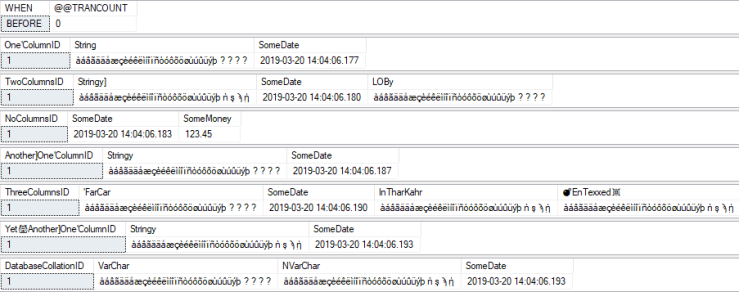

AFTER (with collation fix enabled):
All characters, including the four "special" characters, are all uppercase now.


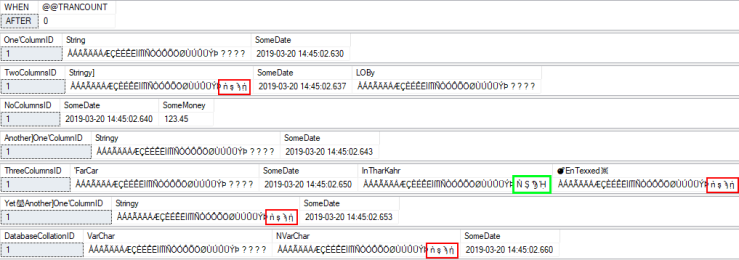
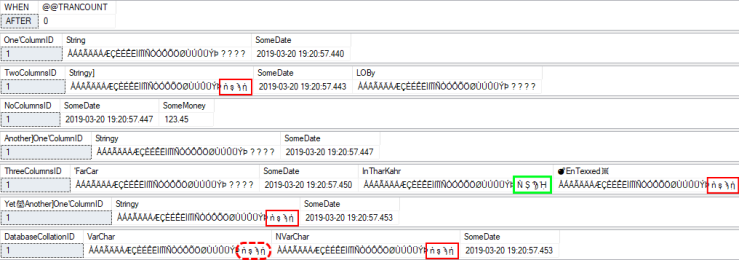
AFTER (with collation fix disabled):
As you can see, without the collation fix (i.e. @FixNVarCharCollation = 0 ), it is possible that you will uppercase some, or most, of the characters, but not all. The columns with missing mappings have the characters that did not change highlighted in red. But why did that one column — highlighted in green — have all of its characters go to uppercase? Because it's using a version 100 collation!

Database Default Collation = UTF8_BIN2
TEST VALUE:
This time, the four "special" characters at the end of the string show up correctly in VARCHAR. This is due to the database having a UTF-8 default collation.


BEFORE:
Only difference is the value in the bottom result set — the one starting with the DatabaseCollationID column — showing the special characters stored correctly in the "VarChar" column.
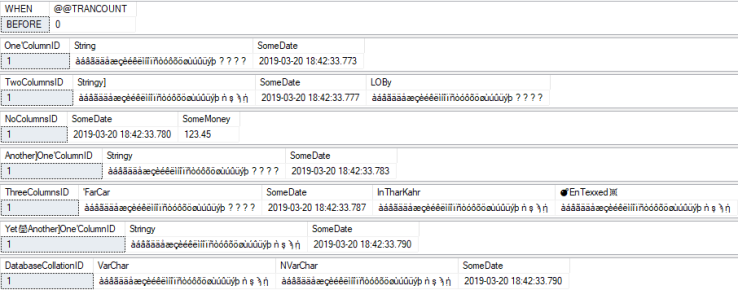

AFTER (with collation fix enabled):
All characters, including the four "special" characters, are all uppercase now.
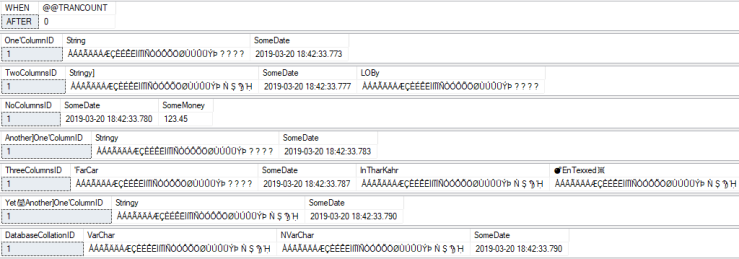
AFTER (with collation fix disabled):
As you can see, without the collation fix (i.e. @FixNVarCharCollation = 0 ), it is possible that you will uppercase some, or most, of the characters, but not all. The columns with missing mappings have the characters that did not change highlighted in red. We already know why the column highlighted in green had all of its characters go to uppercase, but why did the UTF-8 value — highlighted with the red, dashed outline — not have all of its characters uppercase? Because the new UTF8_BIN2 collation is version 80! 😿
Why?
Why go through all of this trouble to construct a Dynamic SQL script when a cursor probably would have taken less time to develop (and certainly would have been an acceptable use of a cursor), especially if the purpose is a one-time maintenance operation? Well:
- With relational databases, most operations are more efficient (sometimes incredibly more efficient) when done in a set-based approach as opposed to row-by-row (i.e. a cursor-based approach).
- Some seemingly set-based approaches are truly row-by-row based on how they are handled internally (recursive CTEs, the APPLY operator, non-inlined scalar and table-valued functions, etc), but they still have the advantage of being usable in a larger set-based operation.
Since set-based approaches have the advantages of performance and flexibility, it helps to practice approaching solutions in this way. And, the more we practice looking at the world in this way, the easier and more natural it will be to come up with efficient, flexible set-based approaches when it truly matters. Hence, even if the application of this particular script is highly specialized and not of general use, at the very least it provides a good example of practicing how to approach problems in a set-based manner. The technique(s) demonstrated here can certainly be used outside of constructing Dynamic SQL.
-
Here's a quick example to show how XML is case-sensitive for element and attribute names:
DECLARE @Bob XML = N'
<test>
  <a>11</a>
  <A>22</A>
  <a>33</a>
</test>
';

SELECT @Bob.value(N'/test[1]/a[1]', N'VARCHAR(100)') AS [a[1]]],
       @Bob.value(N'/test[1]/a[2]', N'VARCHAR(100)') AS [a[2]]],
       @Bob.value(N'/test[1]/A[1]', N'VARCHAR(100)') AS [A[1]]],
       @Bob.value(N'/test[1]/A[2]', N'VARCHAR(100)') AS [A[2]]];

/* Returns:
a[1]    a[2]    A[1]    A[2]
11      33      22      NULL
*/